About This Listing
Border Light Wallpaper by Trisha infotech is a App package in Personalization. Install version 1.4 safely from the direct download flow.
Read Description
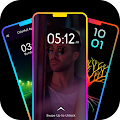
Border light Wallpaper App is Free App .You can use Settings available in the application to customize the EDGE lighting as per your choice like changing the colors, adjust width, type of EDGE lighting border, display notch settings, HD wallpapers and Magical EDGE Lighting.
Wave Edge-LED Border light Live Wallpaper
Border light Wallpaper the app allows you to Optimize your mobile screen with proper settings. Border light is a live wallpaper that shows revolving light moving across the border and corners of your mobile screen.
Border light Live Wallpaper - ED Color Live Wallpaper allows users to set an unique video edge live wallpaper with an animated effects.
Edge lighting - LED Color Live Wallpaper
Border light Live Wallpaper - Magical Edge Lite also allows users to set an unique video edge live wallpaper with an animated effects.
the application also provides an to allow edge light effects notification. application has simple User Interface Design to understand and use the app.
application is free to use and it has a large collection of all animated Edge lighting live wallpaper which all have different effects to make more fantastic your live wallpaper...
Border Light - Border Light Live Wallpaper Free
Borderlight Live Wallpaper - Magical Edge Lite also allows users to set an unique video edge live wallpaper with an animated effects. the application also provides an to allow edge light effects notification. application has simple User Interface Design to understand and use the app.application is free to use and it has a large collection of all animated Edge lighting live wallpaper which all have different effects to make more fantastic your live wallpaper...
Wave Edge-LED Border light Live Wallpaper
Wave Edge-LED Border light Live Wallpaper has convenient User Interface to use and understand it.
there is no need any registration or login process to use the app just install and start to use it, the app also allows you to apply Edge effects as live wallpaper which has changeable with your way.
now it's easy to change settings like.
-: Unique Features :-
> LED Color Live Wallpaper
> Set as Border Light Wallpaper.
> ON/OFF Lighting services.
> Set Edge light.
> Allow changing Edge animation speed.
> Change thickness of Edge Effects.
> Change curve top, bottom or also notch setting with one touch.
> Notch Edge border.
> Best way to set Magical Edge Lite Effects as wallpaper.
> Collection of amazing live wallpaper.
> The app allows setting the opacity of Edge lighting.
> Fantastic Edge live wallpaper...
> Set animation speed...
> Set Edge effect thickness.
> Set Strock color.
> Optimize your mobile screen with proper settings.
What is New in 1.4
No Updates