

Bem Saúde - Vivest
- Developer
- Vivest Oficial
- Category
- Medical
- Installs
- 50,000+
- Price
- Free
Source: Google Play listing Checked: 3 Nov 2026
Looking for Vivest on Android? The matching app on Google Play is Bem Saúde - Vivest by Vivest Oficial. Below: what it does, what’s new, what your phone needs, and where to get it safely.


Overview
What Is Bem Saúde - Vivest?
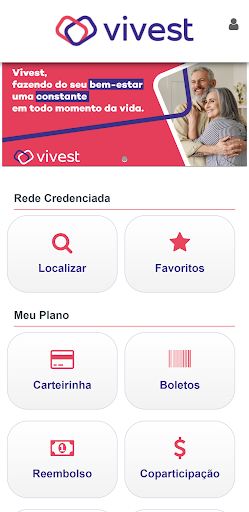
Application to access the medical guide of health plans Funcesp - Digna Sabesp
From the developer’s Google Play description:
Locate the doctors, clinics, hospitals and laboratories in our service network. Search cities with coverage to list all providers or specify a specialty. When you find the desired provider, you will be able to:
- Add it to your favorites list;
- View the address and trigger an installed GPS application to navigate to it;
- Start a phone call;
- Add it to your address book;
- Share it using Gmail, Facebook, WhatsApp, etc.
Photograph and record medical prescriptions in the app to consult when you need to. In addition, set alarms to remind you of appointments, medications and other appointments.
App details
App Specifications
| App name | Bem Saúde - Vivest |
|---|---|
| Developer | Vivest Oficial |
| Package name | com.facilinformatica.facgeobemsaudevivest |
| Category | Medical |
| Content rating | Rated for 3+ |
| Installs | 50,000+ |
| Price | Free |
| Monetisation | No ads · No in-app purchases |
| First released | Jan 14, 2022 |
| Listing checked |
Download
Where to Download Bem Saúde - Vivest
The safest source is the official Google Play listing, which delivers updates automatically and is signed by the developer. APKProZ does not host or modify this file.
Safety and privacy
Staying Safe
Before installing, check that the publisher shown on Google Play is exactly Vivest Oficial. Look-alike apps with similar names and icons are common for popular services, especially government ones.
Read the developer’s privacy policy to see what data the app collects.
Installation
How to Install Bem Saúde - Vivest
- Open the Google Play link above on your Android phone.
- Confirm the developer name reads Vivest Oficial.
- Tap Install and open the app once it finishes.
FAQ
Frequently Asked Questions About Vivest
Which app is used for Vivest?
Bem Saúde - Vivest by Vivest Oficial, available on Google Play.
Who developed Bem Saúde - Vivest?
Bem Saúde - Vivest is published on Google Play by Vivest Oficial.
Is Bem Saúde - Vivest free?
Yes. Google Play lists Bem Saúde - Vivest as free.
More Medical Apps on Google Play


Facts on this page come from the public Google Play listing for Bem Saúde - Vivest as checked on . Ratings, installs and prices change over time; the listing is authoritative. Spotted an error? Tell us.
At a Glance
- App
- Bem Saúde - Vivest
- Developer
- Vivest Oficial
- Source
- Google Play
More Android Apps to Explore


Newly Added Apps
See all




Newly Added Games
See all











Popular Apps
See all









Popular Games
See all









Discovery